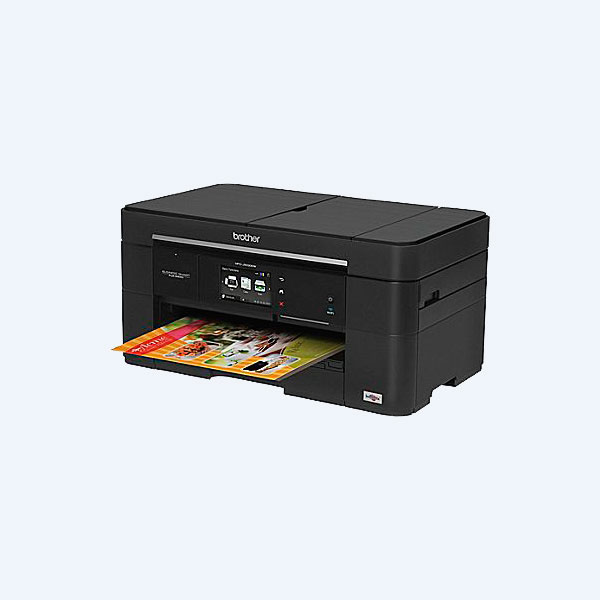
• MFCJ5620DW - Multifuncional Brother MFC J5620DW, 35ppm Negro/27ppm Color, USB/Ethernet
  • MFCJ5620DW - Multifuncional Brother MFC J5620DW, 35ppm Negro/27ppm Color, USB/Ethernet
  • MFCJ5620DW - Multifuncional Brother MFC J5620DW, 35ppm Negro/27ppm Color, USB/Ethernet

Multifuncional Brother MFC J5620DW, 35ppm Negro/27ppm Color, USB/Ethernet 2 años de garantía

Número de Parte: MFCJ5620DW

3,812
IVA incluido en el precio del producto
Tiempo de entrega: de 1 a 5 días hábiles
Precios y disponibilidad sujeta a cambios sin previo aviso

Pago seguro con Paypal y Mercadopago; Visa y Mastercard. Envío con Estafeta, Fedex o DHL. Industria de pagos a nivel mundial Servicios financieros globales más reconocidas en el ámbito internacional PayPal protege su información financiera con sistemas de prevención de fraudes y de seguridad líderes del sector Disponemos de pagos a través de MercadoPago Aceptamos pagos en tiendas OXXO Contamos con los métodos de pago más seguros y prácticos por Internet, garantizando la seguridad de tu dinero Tu compra esta segura bajo el estándar de seguridad SSL de GoDaddy
Overview

Brother™ Business Smart™ Plus Series color inkjet all-in-one with duplex printing provides Small Business users the Ultimate Combination of low cost printing, fast print speeds, and up to 11"x17" output. Save up to 40% with an available Super High-yield black ink replacement cartridge to help lower cost per page‡. Fastest in class print speeds‡ of up to 22ppm black/20ppm color.‡ 250-sheet capacity up to 11"x17" paper tray, up to 35-sheet auto document feeder, and multi-purpose tray for an additional 80-sheet capacity and handling specialty media. 3.7" color TouchScreen Display for intuitive menu navigation and easy setup. Print from compatible mobile devices over your wireless network plus scan documents to popular cloud services‡ from your internet-connected all-in-one.

Main Features
  • Low Cost Printing Super High-yield replacement ink cartridges (approx. 2,400 pages black and 1,200 pages color)‡.
  • Fastest in Class± With speeds up to 35ppm black and 27ppm color‡. ISO print speeds up to 22ppm black and 20ppm color (ISO/IEC 24734)‡.
  • Wireless Mobile Device Printing Wireless printing from your mobile device via±: AirPrint™, Google Cloud Print™, Brother™ iPrint&Scan, and Wi-Fi Direct®.
  • Intuitive TouchScreen Display Easily navigate onscreen menus on a 3.7" TouchScreen Display with swipe functionality.
  • Paper Handling New multi-purpose tray offers convenient printing of specialty paper, larger formats, and envelopes. Accepts up to 80 sheets of 8.5"x11" or up to 5 sheets of 11"x17".
  • Paper Capacity 250-sheet paper tray capacity up to 11"x17" and ADF up to 35 sheets.
  • Innovative Print Technology Landscape Print Technology stores and feeds paper in a landscape orientation for a space saving design.
  • Web Connect Scan to popular cloud services including Google Drive™, Dropbox, Evernote® and Evernote Business® , Microsoft OneNote® and more‡.
  • Free Brother Cloud Apps Capture and convert documents directly from your machine‡.
  • Warranty & Support 2-year limited warranty & free phone support for the life of the product.

‡Conditions †System Requirements
The Brother™ Business Smart™ Plus Series MFC-J5620DW helps Boost Productivity with the Ultimate Combination for Small Business: Low-cost Printing, Flexible Paper Handling, and Fast Print Speeds.

Building on the success of the popular Business Smart Series of color inkjet all-in-ones, Brother introduces the Business Smart Plus MFC-J5620DW. It offers the Ultimate Combination of features designed for small business users. It uses innovative Brother Landscape Print Technology to pack low-cost printing, flexible paper handling, and up to 11” x 17” printing directly from the paper tray into an office-friendly, space-saving design. In addition to copying, scanning and faxing, it also boasts fastest in class print speeds1 up to 22ppm black2 /20ppm color2 (ISO/IEC 24734). You’ll get all of this, plus a two-year limited warranty and free phone support for the life of your product.
The MFC-J5620DW delivers the Ultimate Combination for small business.
Help keep your document creation budget in check with low-cost printing by using Super High-yield replacement ink cartridges3.

The MFC-J5620DW helps small businesses keep an eye on their printing budgets. It can be used with optional Super High-yield ink cartridges3 that provide up to four times the output4 of High-yield ink cartridges to print approximately 2,400 pages5 black and 1,200 pages5 color to help reduce cost per page, which can be critical in higher-volume office printing environments. Further cost reduction can be achieved when inks are purchased in money-saving multi-packs. The MFC-J5620DW also features automatic duplex printing to help reduce paper use and costs.
Optional Super High-yield ink cartridges help lower printing costs.
Flexible paper handling including up to 11” x 17” 250-sheet capacity paper tray, an innovative Multi-Purpose Tray, and 35-sheet capacity auto document feeder.

The MFC-J5620DW addresses the need for higher-volume printing of color ledger documents like spreadsheets and marketing materials with a 250-sheet capacity tray that holds paper up to 11” x 17”. Its innovative Multi-Purpose Tray allows easy printing on specialty paper or envelopes without changing the paper in the main tray and can also increase overall capacity by holding up to 80 sheets of 8.5” x 11” paper or up to 5 sheets of 11” x 17” paper. The 35-sheet capacity auto document feeder helps save time when copying, scanning or faxing multi-page documents.
Multi-Purpose Tray can be used for printing on specialty paper or to add paper capacity.
Print wirelessly from your mobile device6 using Airprint™, Wi-Fi Direct®, and more.

The MFC-J5620DW gives you a full menu of choices for connecting to Apple®, Android™, Kindle Fire™, Windows® Phone, or Blackberry mobile devices. It supports wireless printing from your mobile device via6: AirPrint™, Google Cloud Print™, Brother™ iPrint & Scan, Cortado Workplace and also Wi-Fi Direct®, which allows you to print wirelessly from a computer or mobile device without the need for a router.
Multiple options for wireless printing from your compatible mobile device.(6)
The MFC-J5620DW offers multiple connectivity options, plus an intuitive 3.7” TouchScreen Display.

Brother designed the MFC-J5620DW to make it easy to connect to a wireless network using the wireless assistant that walks you through set up. You don’t need a USB cable, and you won’t even need to know your wireless network password. Share the machine with others on a wireless network using 802.11 b/g/n or wired network via Ethernet, or connect to a single computer using a USB cable3 via the Hi-Speed USB port. Using the machine is equally intuitive. The simplified control panel lets you swipe and tap on the 3.7” TouchScreen Display and use the integrated keypad to navigate menus, change settings, and create custom shortcuts for frequently used settings.
Generously-sized 3.7” TouchScreen Display for intuitive navigation of machine functionality.
Web Connect interface7 and Free Brother Cloud Apps8 add a new dimension of functionality to your color inkjet all-in-one.

You can access popular cloud services directly from your internet-connected MFC-J5620DW from the TouchScreen Display using the Web Connect7 interface. Scan to and print from specific web services without using a computer. Access DROPBOX, GOOGLE DRIVE™, BOX, ONEDRIVE®, ONENOTE® and more. The MFC-J5620DW also comes with a suite of pre-installed, innovative Brother Cloud Apps8 that you access directly from the machine’s TouchScreen Display. You’ll be amazed by the functionality of these document management and sharing apps.
Scan to leading cloud services directly from the MFC-J5620DW without using a computer. (7)
Exclusive Landscape Print Technology is customer-focused innovation.

While developing the original Business Smart Series, Brother sought to create a product that would help eliminate the need for compromising on features or design. This led us to introduce our innovative Landscape Print Technology, which stores and feeds paper into the machine in landscape orientation. This unique, space-saving technology allows the MFC-J5620DW to deliver the Ultimate Combination for small business in a smaller overall footprint.
Innovative Landscape Print Technology helps reduce the overall footprint of the MFC-J5620DW.
At Your Side with Award-winning Performance and Free Phone Support for the Life of Your Product.

At Brother, our goal is to provide you with printers and all-in-ones that you can depend on to consistently deliver high performance, reliability, and value for your business. But don’t just take our word for it. In 2013, Brother Printers and All-in-Ones were recognized as #1 for Reliability and #1 for Overall Satisfaction in the PCMag.com Business Choice Awards, an annual reader-driven survey on hardware, software, and services used in business environments. But our commitment doesn’t stop there: we offer a two-year limited warranty on the MFC-J5620DW and stand behind your purchase with FREE phone support for the life of your product. Whether you have a product question or a technical issue, Brother is always at your side.

Print
Print TechnologyColor Inkjet Technology
Maximum Printing SizeUp to 11" x 17" (Ledger via by-pass)
Consumable Type4-Cartridge Ink System
Max. Black Print Speed (ppm)35ppm Black
Max. Color Print Speed (ppm)27ppm Color
ISO-based Print Speed (black)‡22ppm (ISO/IEC 24734)
Conditions
ISO-based Print Speed (color)‡20ppm (ISO/IEC 24734)
Conditions
Print Resolution (maximum dpi)6000 x 1200 dpi‡
Conditions
Borderless PrintingYes‡
Conditions
Printer Driver Compatibility†Windows® / Mac OS®
System Requirements

back to top
ConditionsCopy
Copying CapabilityB/W & Color Copying
Design StyleFlatbed
Max. Automatic Document Feeder Capacity‡35-Sheet ADF
Conditions
ISO-based Copy Speed (black)‡12ppm (ISO/IEC 24735)
Conditions
ISO-based Copy Speed (color)‡9ppm (ISO/IEC 24735)
Conditions
Stand-alone CopyingNo PC Required
Reduction/Enlargement25% - 400%, in 1% increments
Sorting FunctionYes
N in 1 Function2in1 / 2in1(ID) / 4in1 Copy
Poster FunctionYes
Document Glass Size8.5" x 11.7"
ID CopyYes

back to top
ConditionsScan
Color/Black & White ScanningB/W & Color Scanning
Scanning CapabilityB/W & Color Scanning
Max. Interpolated Scan Resolution (dpi)†19,200 x 19,200dpi
System Requirements
Optical Scan Resolution (dpi)
Precios y disponibilidad sujetos a cambio sin previo aviso. Las imágenes pueden no corresponder al producto y sólo se muestran con fines ilustrativos. Para envíos gratis, aplican restricciones.